1. 工作流
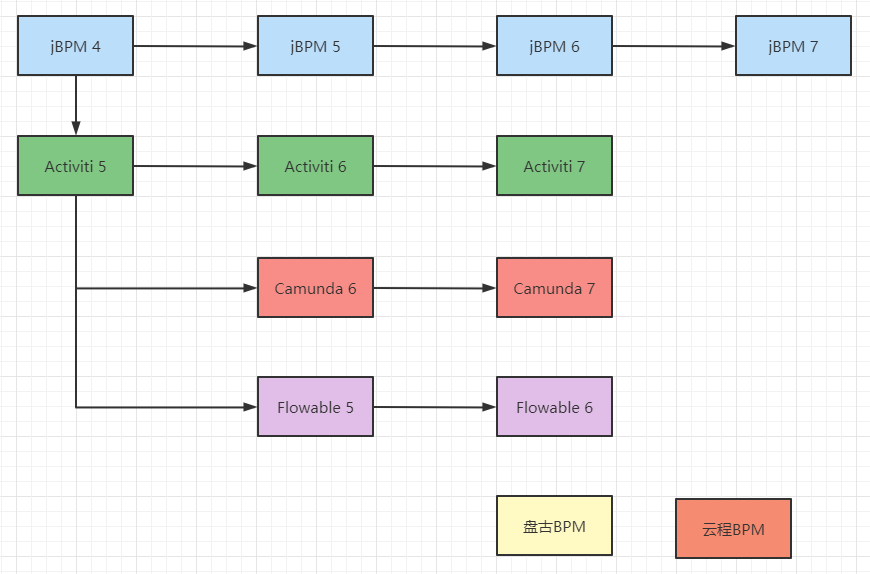
简单地来讲,工作流就是在计算机的协助下实现流程的自动化控制。目前,笔者熟知的主流的框架有:Camunda 、Flowable 、Activiti 、jBPM、还有我们国产的盘古BPM、云程。其中,Camunda 、Flowable 都有商业版(企业版)和非商业版(社区开源版)。
技术产品各有千秋,Flowable专注于流程引擎,Activiti现在专注于Cloud。笔者最推荐Camunda,盘古BPM还没用过看起来应该也挺好用的。
关于Camunda补充几篇文章
- Camunda开源版与商业版的差异
- idea开发工作流使用camunda-model进行activiti7的开发
- 基于camunda如何实现会签:camunda会签流程配置与原理解析
2. 流程设计器
笔者亲测,IntelliJ IDEA 2021.1 (Ultimate Edition) 不支持 actiBPM插件。
强烈推荐用 camunda-modeler ,或者用 bpmn-js
首先,下载Camunda
https://camunda.com/download/

解压以后,直接双击.exe文件运行
也可以在IDEA中把它作为外部工具用


笔者更习惯直接双击.exe打开
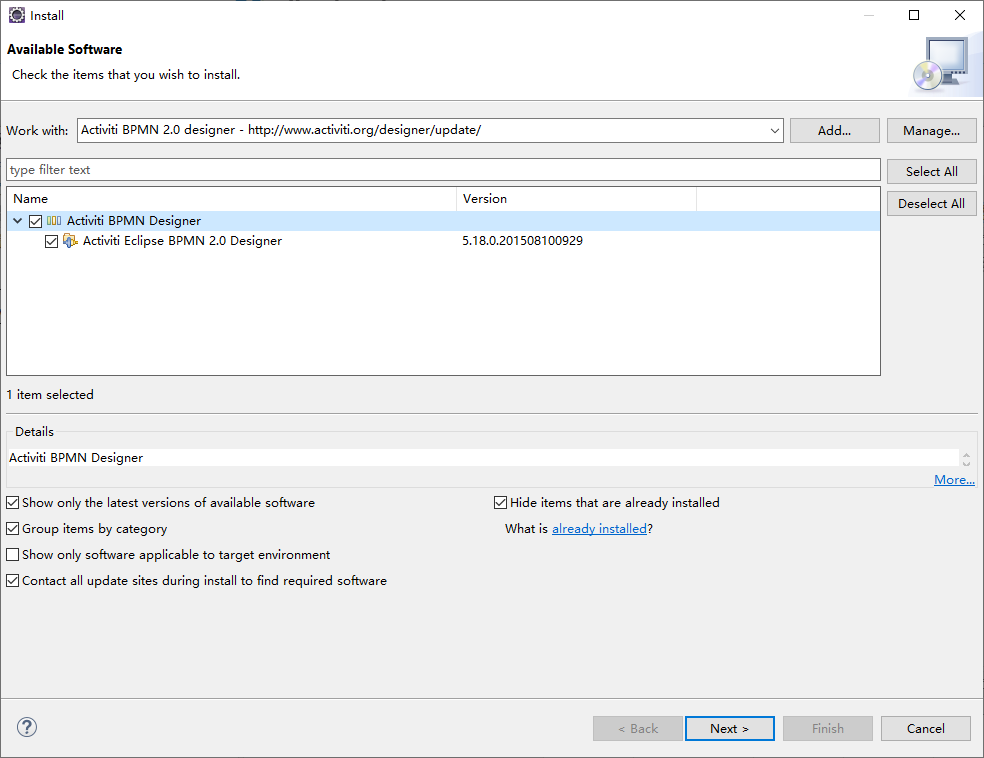
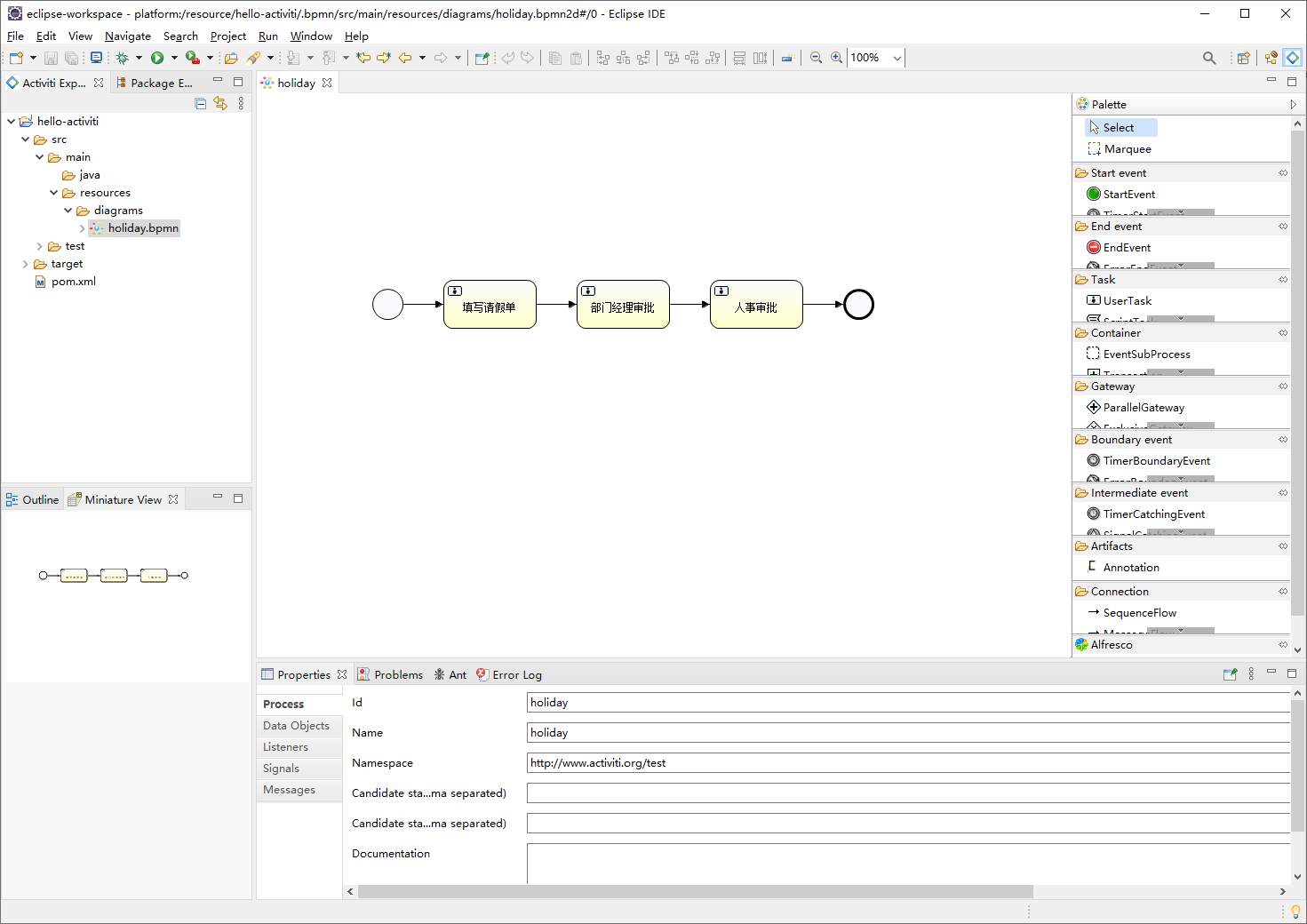
Activiti为Eclipse开发了一个BPM插件"Activiti Eclipse Designer"
https://www.activiti.org/userguide/index.html#activitiDesigner
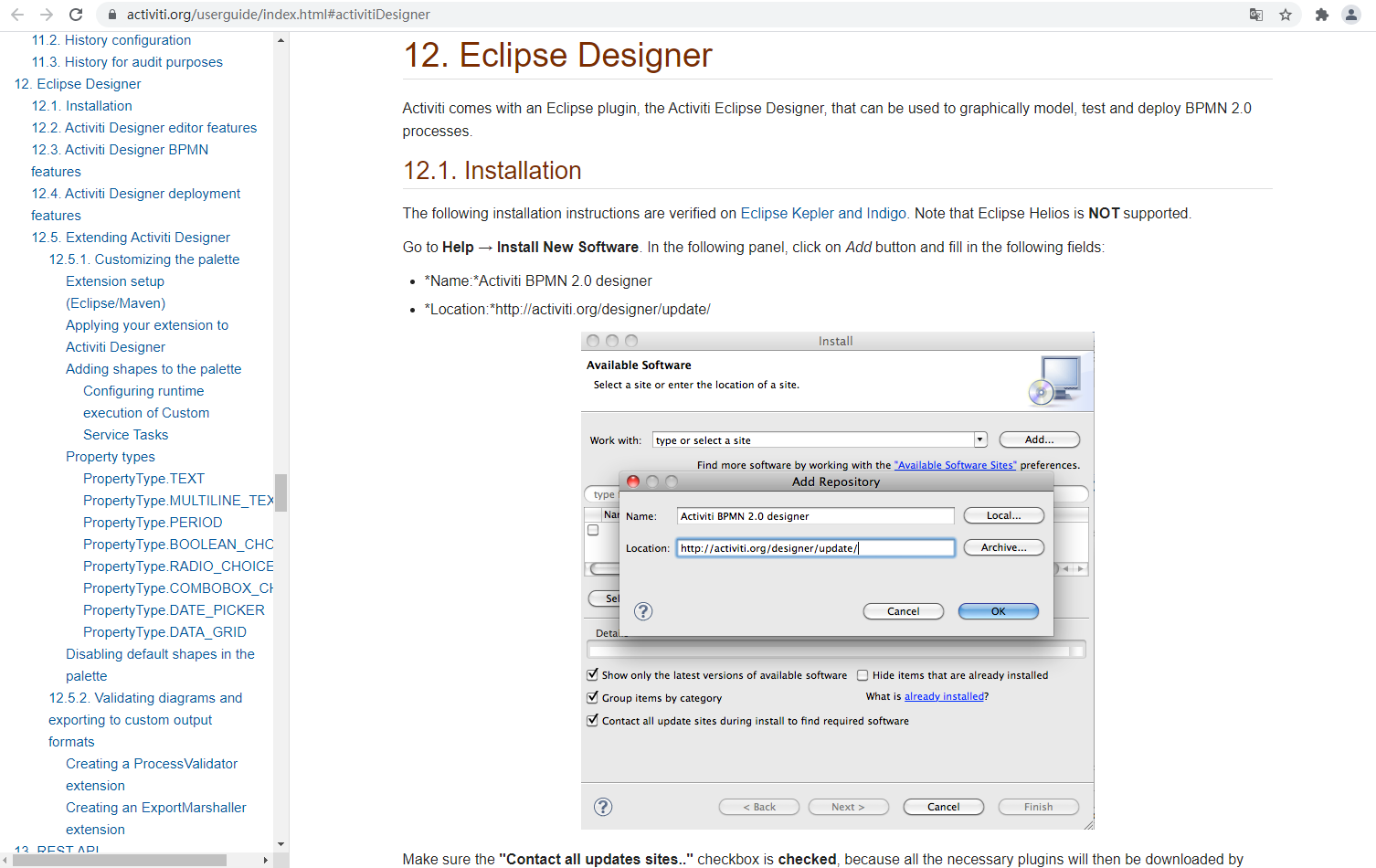
为了使用Activiti Designer,笔者又下载了Eclipse IDE,专门为了Activiti开发
3. Activiti7 快速开始
工作流的作用是实现流程的自动化控制。使用Activiti这种工作流框架大致都分为以下几个步骤:
- 流程定义
- 部署流程定义
- 启动流程实例
- 查询代表任务
- 完成任务
- 结束流程
术语补充:
- BPM :业务流程管理
- BPMN :业务流程模型和符号
首先,来引入依赖
1 <dependency>2 <groupId>org.activiti</groupId>3 <artifactId>activiti-spring-boot-starter</artifactId>4 <version>7.1.0.M6</version>5 </dependency>
学习Activiti主要是学习这些Service的使用
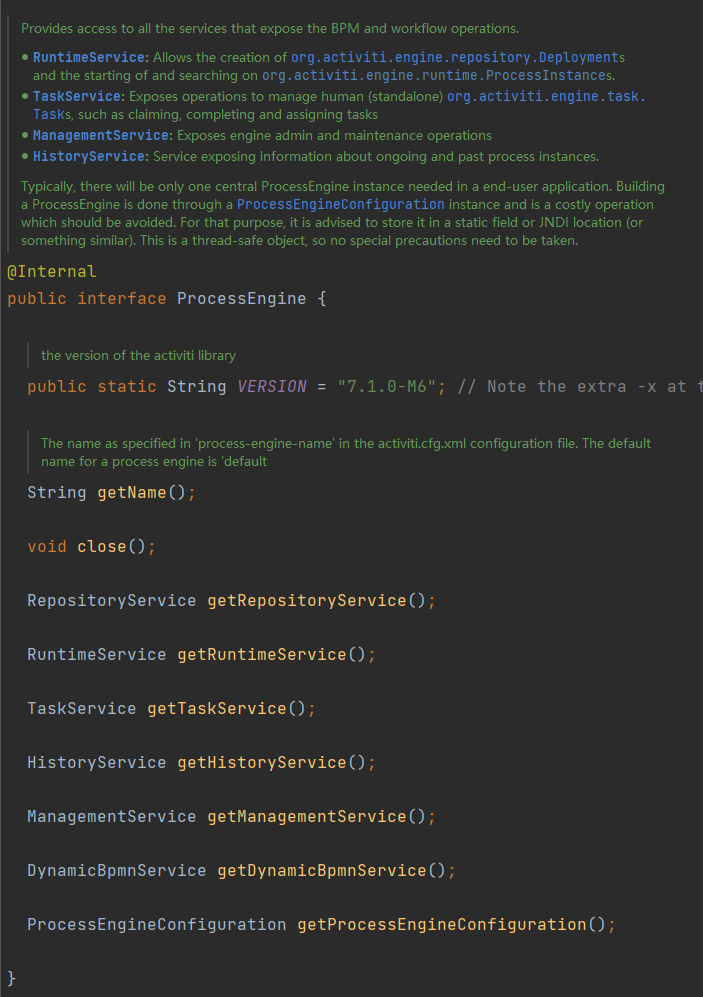
3.1. 创建ProcessEngine
1 package com.cjs.example.activiti; 2 3 import org.activiti.engine.ProcessEngine; 4 import org.activiti.engine.ProcessEngineConfiguration; 5 import org.activiti.engine.ProcessEngines; 6 import org.junit.jupiter.api.Test; 7 8 /** 9 * @Author ChengJianSheng10 * @Date 2021/7/611 */12 public class ProcessEngineTests {13 14 @Test15 public void testProcessEngine1() {16 ProcessEngine processEngine = ProcessEngines.getDefaultProcessEngine();17 System.out.println(processEngine);18 }19 20 @Test21 public void testProcessEngine2() {22 ProcessEngineConfiguration processEngineConfiguration = ProcessEngineConfiguration.createProcessEngineConfigurationFromResource("activiti.cfg.);23 ProcessEngine processEngine = processEngineConfiguration.buildProcessEngine();24 System.out.println(processEngine);25 }26 27 }ProcessEngineConfiguration是用来创建ProcessEngine,默认情况下,会读取classpath下的activiti.cfg.
这里,由于还没有与Spring Boot整合,也不是一个Web环境,所以,姑且先建一个这样的文件吧,真正开发的时候肯定不是这样做的
1 <? 2 <beans 3 4 xsi:schemaLocation="http://www.springframework.org/schema/beans >> 5 6 <bean id="processEngineConfiguration" name="processEngineConfiguration" > 7 <property name="jdbcDriver" value="com.mysql.jdbc.Driver"/> 8 <property name="jdbcUrl" value="jdbc:mysql://localhost:3306/activiti?useUnicode=true&characterEncoding=utf8"/> 9 <property name="jdbcUsername" value="root"/>10 <property name="jdbcPassword" value="123456"/>11 <property name="databaseSchemaUpdate" value="true"/>12 </bean>13 </beans>
只要ProcessEngine被成功创建,就会生成25张表
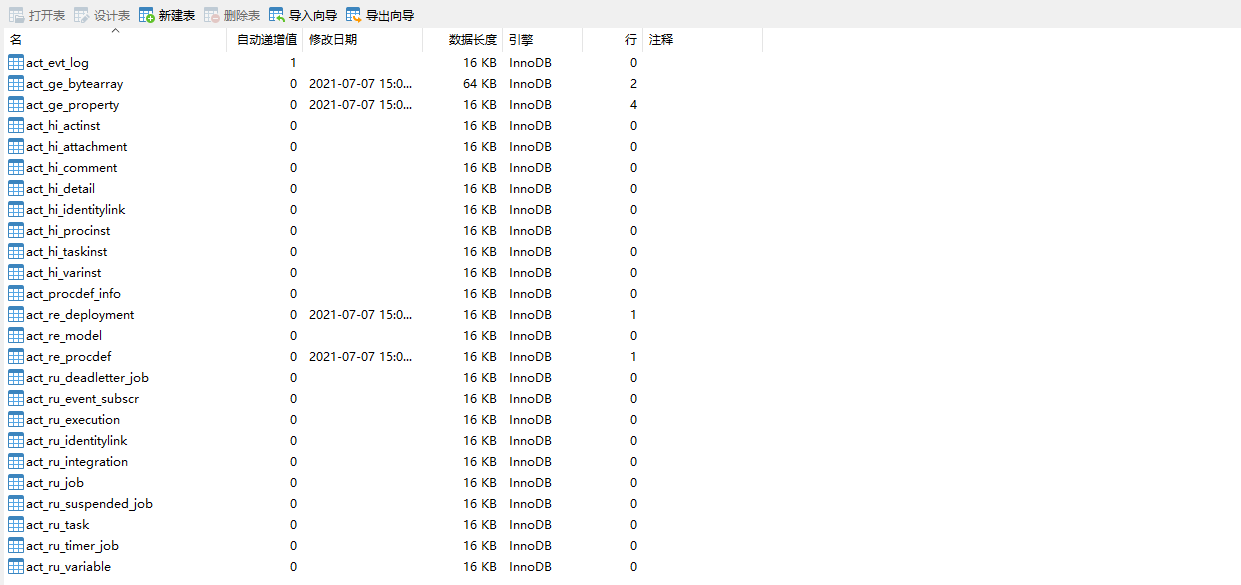
这里我们可以看出,Activiti最本质最核心的东西就是将流程定义转换成表记录,表面上看好像是一个图片,其实它是一个
3.2. 流程定义
用 Camunda Modeler 或者 Activiti Eclipse Designer 画好流程图

1 <? 2 <definitions "http://www.omg.org/spec/BPMN/20100524/MODEL" 3 "http://www.w3.org/2001/ 4 "http://www.w3.org/2001/ 5 "http://activiti.org/bpmn" 6 "http://www.omg.org/spec/BPMN/20100524/DI" 7 "http://www.omg.org/spec/DD/20100524/DC" 8 "http://www.omg.org/spec/DD/20100524/DI" 9 typeLanguage="http://www.w3.org/2001/10 expressionLanguage="http://www.w3.org/1999/XPath"11 targetNamespace="http://www.activiti.org/test">12 13 <process id="holiday" name="holiday" isExecutable="true">14 <startEvent id="startevent1" name="Start"></startEvent>15 <userTask id="usertask1" name="填写请假单" activiti:assignee="${assignee1}"></userTask>16 <sequenceFlow id="flow1" sourceRef="startevent1" targetRef="usertask1"></sequenceFlow>17 <userTask id="usertask2" name="部门经理审批" activiti:assignee="${assignee2}"></userTask>18 <sequenceFlow id="flow2" sourceRef="usertask1" targetRef="usertask2"></sequenceFlow>19 <userTask id="usertask3" name="人事审批" activiti:candidateUsers="tom,jerry"></userTask>20 <sequenceFlow id="flow3" sourceRef="usertask2" targetRef="usertask3"></sequenceFlow>21 <endEvent id="endevent1" name="End"></endEvent>22 <sequenceFlow id="flow4" sourceRef="usertask3" targetRef="endevent1"></sequenceFlow>23 </process>24 25 <bpmndi:BPMNDiagram id="BPMNDiagram_holiday">26 <bpmndi:BPMNPlane bpmnElement="holiday" id="BPMNPlane_holiday">27 <bpmndi:BPMNShape bpmnElement="startevent1" id="BPMNShape_startevent1">28 <omgdc:Bounds height="35.0" width="35.0" x="130.0" y="220.0"></omgdc:Bounds>29 </bpmndi:BPMNShape>30 <bpmndi:BPMNShape bpmnElement="usertask1" id="BPMNShape_usertask1">31 <omgdc:Bounds height="55.0" width="105.0" x="210.0" y="210.0"></omgdc:Bounds>32 </bpmndi:BPMNShape>33 <bpmndi:BPMNShape bpmnElement="usertask2" id="BPMNShape_usertask2">34 <omgdc:Bounds height="55.0" width="105.0" x="360.0" y="210.0"></omgdc:Bounds>35 </bpmndi:BPMNShape>36 <bpmndi:BPMNShape bpmnElement="usertask3" id="BPMNShape_usertask3">37 <omgdc:Bounds height="55.0" width="105.0" x="510.0" y="210.0"></omgdc:Bounds>38 </bpmndi:BPMNShape>39 <bpmndi:BPMNShape bpmnElement="endevent1" id="BPMNShape_endevent1">40 <omgdc:Bounds height="35.0" width="35.0" x="660.0" y="220.0"></omgdc:Bounds>41 </bpmndi:BPMNShape>42 <bpmndi:BPMNEdge bpmnElement="flow1" id="BPMNEdge_flow1">43 <omgdi:waypoint x="165.0" y="237.0"></omgdi:waypoint>44 <omgdi:waypoint x="210.0" y="237.0"></omgdi:waypoint>45 </bpmndi:BPMNEdge>46 <bpmndi:BPMNEdge bpmnElement="flow2" id="BPMNEdge_flow2">47 <omgdi:waypoint x="315.0" y="237.0"></omgdi:waypoint>48 <omgdi:waypoint x="360.0" y="237.0"></omgdi:waypoint>49 </bpmndi:BPMNEdge>50 <bpmndi:BPMNEdge bpmnElement="flow3" id="BPMNEdge_flow3">51 <omgdi:waypoint x="465.0" y="237.0"></omgdi:waypoint>52 <omgdi:waypoint x="510.0" y="237.0"></omgdi:waypoint>53 </bpmndi:BPMNEdge>54 <bpmndi:BPMNEdge bpmnElement="flow4" id="BPMNEdge_flow4">55 <omgdi:waypoint x="615.0" y="237.0"></omgdi:waypoint>56 <omgdi:waypoint x="660.0" y="237.0"></omgdi:waypoint>57 </bpmndi:BPMNEdge>58 </bpmndi:BPMNPlane>59 </bpmndi:BPMNDiagram>60 61 </definitions>
1 ProcessEngine processEngine = ProcessEngines.getDefaultProcessEngine(); 2 3 RepositoryService repositoryService = processEngine.getRepositoryService(); 4 5 Deployment deployment = repositoryService.createDeployment() 6 .addClasspathResource("diagram/holiday.bpmn") 7 .addClasspathResource("diagram/holiday.png") 8 .name("请假流程") 9 .key("holiday")10 .deploy();11 12 13 // Deployment deployment = repositoryService.createDeployment()14 // .addZipInputStream()15 // .name()16 // .key()17 // .deploy();18 19 System.out.println(deployment.getId());也可以把这两个文件放在一起打包程一个zip压缩包



可以看到,act_re_procdef表中关联了act_re_deployment的ID,act_ge_bytearray表中也关联了act_re_deployment的ID
processDefinitionId是holiday:1:4
deploymentId是1
1 RepositoryService repositoryService = processEngine.getRepositoryService(); 2 3 // 查询流程部署 4 Deployment deployment = repositoryService.createDeploymentQuery().deploymentKey("holiday").singleResult(); 5 // 查询流程定义 6 ProcessDefinition processDefinition = repositoryService.createProcessDefinitionQuery().deploymentId(deployment.getId()).singleResult(); 7 // 流程定义是否被挂起/暂停 8 boolean suspended = processDefinition.isSuspended(); 9 // 删除部署10 repositoryService.deleteDeployment(deployment.getId());11 // 激活流程定义12 repositoryService.activateProcessDefinitionById(processDefinition.getId());13 // 挂起/暂停流程定义14 repositoryService.suspendProcessDefinitionById(processDefinition.getId());15 // 查看流程图图片16 InputStream is = repositoryService.getResourceAsStream(deployment.getId(), processDefinition.getDiagramResourceName());3.3. 流程实例
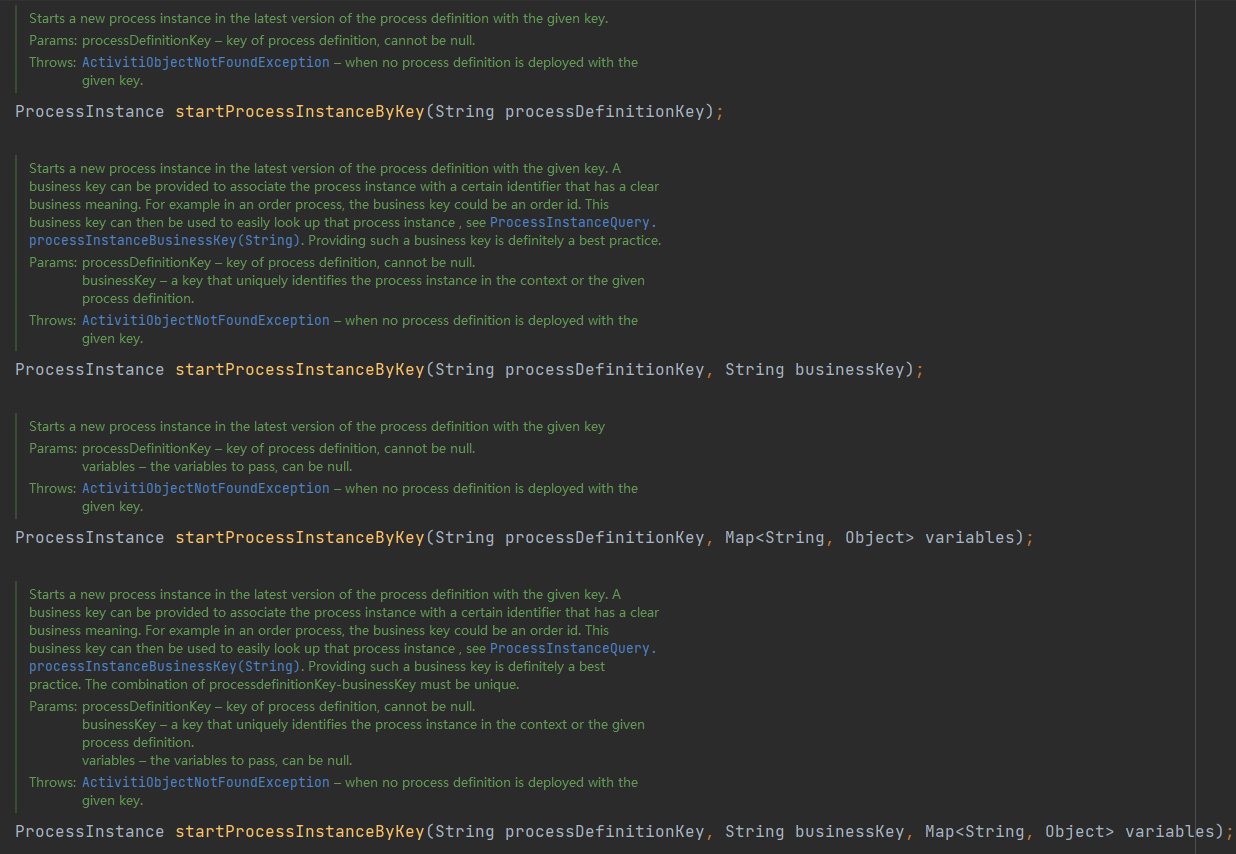
1 RuntimeService runtimeService = processEngine.getRuntimeService(); 2 3 Map<String, Object> variables = new HashMap<>(); 4 variables.put("assignee1", "zhangsan"); 5 variables.put("assignee2", "lisi"); 7 8 ProcessInstance processInstance = runtimeService.startProcessInstanceByKey("holiday", variables); 9 10 System.out.println(processInstance.getProcessInstanceId());11 System.out.println(processInstance.getProcessDefinitionId());



3.5. 任务
1 TaskService taskService = processEngine.getTaskService();2 // 查询待办任务3 List<Task> taskList = taskService.createTaskQuery().taskAssignee("zhangsan").list();4 5 for (Task task : taskList) {6 // 完成任务7 taskService.complete(task.getId());8 }现在,已经完成了zhangsan和lisi的任务,流程已经走到人事审批了,看表





接下来,查询tom和jerry的任务时,就不能用taskAssignee("tom")这样了,因为人事审批这个节点设置的是两个候选者,他们都可以看到任务,但是最终只能由一个人去完成
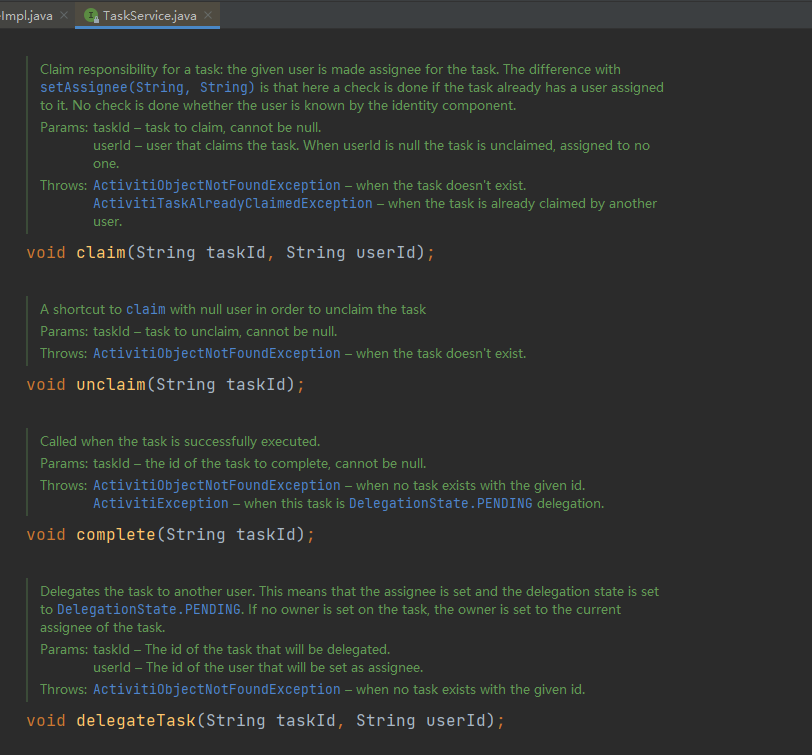
首先,需要声明任务由谁负责,然后再完成,不然任务不会分配给任何人
1 TaskService taskService = processEngine.getTaskService(); 2 3 // 查询待办任务 4 Task task = taskService.createTaskQuery() 5 .processDefinitionKey("holiday") 6 .taskCandidateUser("tom") 7 .singleResult(); 8 9 // 声明任务的责任人是谁10 taskService.claim(task.getId(), "tom");11 12 // 完成任务13 taskService.complete(task.getId());在tom拾取了这个任务以后,当前任务就分配给了tom



假设,拾取任务以后不想办理了,可以选择将自己当前的任务指派给其他人办理,或者再还回去
当我们把任务指派给jack以后
1 /** 2 * 指派 3 */ 4 5 // 指派的第一种方式 6 taskService.setAssignee(task.getId(), "jack"); 7 8 // 指派的第二种方式 9 taskService.deleteCandidateUser(task.getId(), "tom");10 taskService.addCandidateUser(task.getId(), "jack");



还可以将任务委派给他人做
委派:是将任务节点分给其他人处理,等其他人处理好之后,委派任务会自动回到委派人的任务中
1 // 将任务进行委派2 taskService.delegateTask(task.getId(), "rose");3 // 被委派人办理任务后,委派人标记任务已完成4 taskService.resolveTask(task.getId());
将任务重新放回去
1 /**2 * 将任务重新放回去3 */ 4 // 第一种写法5 taskService.unclaim(task.getId());6 // 第二种写法7 taskService.setAssignee(task.getId(), null);
完整代码片段如下:
1 // 查询待办任务 2 Task task = taskService.createTaskQuery() 3 .processDefinitionKey("holiday") 4 // .taskCandidateUser("tom") 5 .taskAssignee("jack") 6 .singleResult(); 7 8 // 拾取任务 9 taskService.claim(task.getId(), "tom");10 11 // 指派12 taskService.setAssignee(task.getId(), "jack");13 14 taskService.deleteCandidateUser(task.getId(), "tom");15 taskService.addCandidateUser(task.getId(), "jack");16 17 // 重新放回去18 taskService.setAssignee(task.getId(), null);19 taskService.unclaim(task.getId());20 21 // 完成任务22 taskService.complete(task.getId());人事审批后,整个流程就结束了

一个流程实例走完以后,后续只能通过历史记录去查询它了
1 HistoryService historyService = processEngine.getHistoryService();2 // 历史查询3 List<HistoricActivityInstance> list = historyService.createHistoricActivityInstanceQuery()4 .processInstanceId("7501").orderByHistoricActivityInstanceStartTime().asc().list();5 for (HistoricActivityInstance historicActivityInstance : list) {6 System.out.println(historicActivityInstance.getActivityName() + ":" + historicActivityInstance.getAssignee());7 }3.6. 网关
前面的请假流程比较简单(PS:故意简单设置的),接下来再看一下稍微复杂一点的报销流程(PS:也是故意复杂设置的)
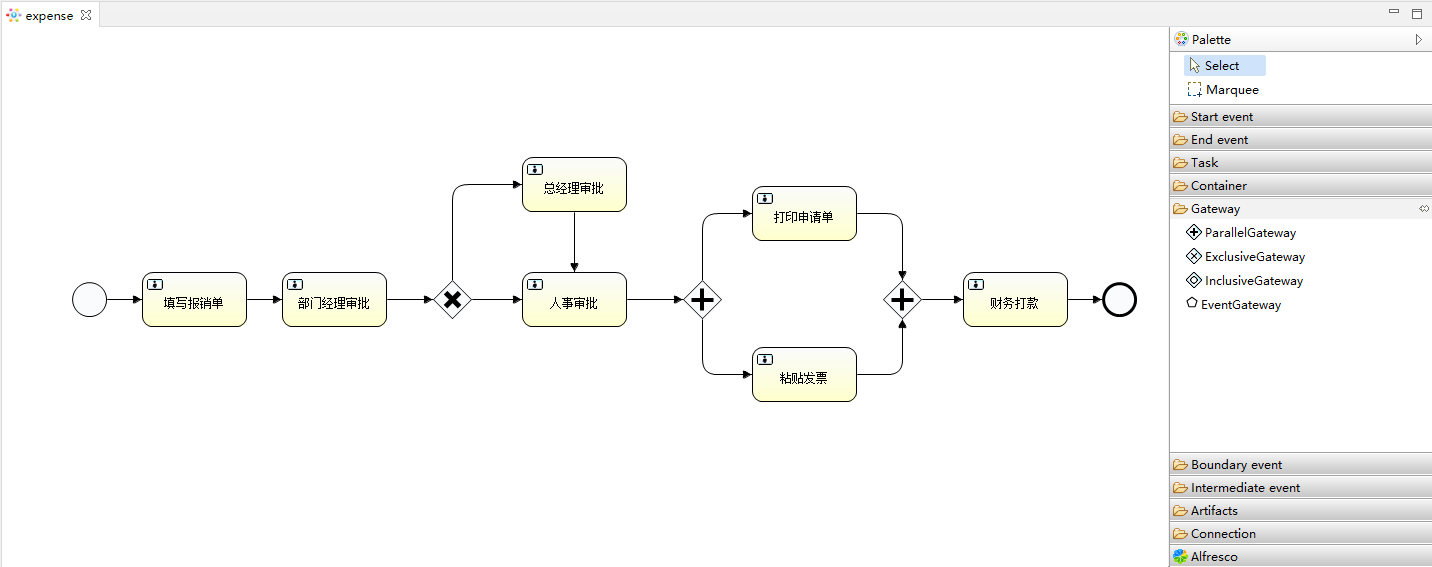
1 <? 2 <definitions 3 "http://www.omg.org/spec/BPMN/20100524/MODEL" 4 "http://www.w3.org/2001/ 5 "http://www.w3.org/2001/ 6 "http://activiti.org/bpmn" 7 "http://www.omg.org/spec/BPMN/20100524/DI" 8 "http://www.omg.org/spec/DD/20100524/DC" 9 "http://www.omg.org/spec/DD/20100524/DI" 10 typeLanguage="http://www.w3.org/2001/ 11 expressionLanguage="http://www.w3.org/1999/XPath" 12 targetNamespace="http://www.activiti.org/test"> 13 14 <process id="expense" name="expense" isExecutable="true"> 15 <documentation>报销流程</documentation> 16 <startEvent id="startevent1" name="Start"></startEvent> 17 <userTask id="usertask1" name="填写报销单" activiti:assignee="${expense.username}"></userTask> 18 <sequenceFlow id="flow1" sourceRef="startevent1" targetRef="usertask1"></sequenceFlow> 19 <userTask id="usertask2" name="部门经理审批" activiti:assignee="${deptManager}"></userTask> 20 <sequenceFlow id="flow2" sourceRef="usertask1" targetRef="usertask2"></sequenceFlow> 21 <exclusiveGateway id="exclusivegateway2" name="Exclusive Gateway"></exclusiveGateway> 22 <sequenceFlow id="flow3" sourceRef="usertask2" targetRef="exclusivegateway2"></sequenceFlow> 23 <userTask id="usertask3" name="人事审批" activiti:assignee="${cho}"></userTask> 24 <sequenceFlow id="flow6" sourceRef="exclusivegateway2" targetRef="usertask3"> 25 <conditionExpression xsi:type="tFormalExpression"><![CDATA[${expense.amount <= 500}]]></conditionExpression> 26 </sequenceFlow> 27 <userTask id="usertask4" name="总经理审批" activiti:assignee="${ceo}"></userTask> 28 <sequenceFlow id="flow8" sourceRef="usertask4" targetRef="usertask3"></sequenceFlow> 29 <sequenceFlow id="flow10" sourceRef="exclusivegateway2" targetRef="usertask4"> 30 <conditionExpression xsi:type="tFormalExpression"><![CDATA[${expense.amount > 500}]]></conditionExpression> 31 </sequenceFlow> 32 <userTask id="usertask5" name="打印申请单" activiti:assignee="zhangsan"></userTask> 33 <userTask id="usertask6" name="粘贴发票" activiti:assignee="lisi"></userTask> 34 <parallelGateway id="parallelgateway1" name="Parallel Gateway"></parallelGateway> 35 <sequenceFlow id="flow11" sourceRef="usertask3" targetRef="parallelgateway1"></sequenceFlow> 36 <sequenceFlow id="flow12" sourceRef="parallelgateway1" targetRef="usertask5"></sequenceFlow> 37 <sequenceFlow id="flow13" sourceRef="parallelgateway1" targetRef="usertask6"></sequenceFlow> 38 <parallelGateway id="parallelgateway2" name="Parallel Gateway"></parallelGateway> 39 <sequenceFlow id="flow15" sourceRef="usertask5" targetRef="parallelgateway2"></sequenceFlow> 40 <sequenceFlow id="flow16" sourceRef="usertask6" targetRef="parallelgateway2"></sequenceFlow> 41 <userTask id="usertask7" name="财务打款" activiti:assignee="${cfo}"></userTask> 42 <sequenceFlow id="flow17" sourceRef="parallelgateway2" targetRef="usertask7"></sequenceFlow> 43 <endEvent id="endevent1" name="End"></endEvent> 44 <sequenceFlow id="flow18" sourceRef="usertask7" targetRef="endevent1"></sequenceFlow> 45 </process> 46 <bpmndi:BPMNDiagram id="BPMNDiagram_expense"> 47 <bpmndi:BPMNPlane bpmnElement="expense" id="BPMNPlane_expense"> 48 <bpmndi:BPMNShape bpmnElement="startevent1" id="BPMNShape_startevent1"> 49 <omgdc:Bounds height="35.0" width="35.0" x="70.0" y="255.0"></omgdc:Bounds> 50 </bpmndi:BPMNShape> 51 <bpmndi:BPMNShape bpmnElement="usertask1" id="BPMNShape_usertask1"> 52 <omgdc:Bounds height="55.0" width="105.0" x="140.0" y="245.0"></omgdc:Bounds> 53 </bpmndi:BPMNShape> 54 <bpmndi:BPMNShape bpmnElement="usertask2" id="BPMNShape_usertask2"> 55 <omgdc:Bounds height="55.0" width="105.0" x="280.0" y="245.0"></omgdc:Bounds> 56 </bpmndi:BPMNShape> 57 <bpmndi:BPMNShape bpmnElement="exclusivegateway2" id="BPMNShape_exclusivegateway2"> 58 <omgdc:Bounds height="40.0" width="40.0" x="430.0" y="252.0"></omgdc:Bounds> 59 </bpmndi:BPMNShape> 60 <bpmndi:BPMNShape bpmnElement="usertask3" id="BPMNShape_usertask3"> 61 <omgdc:Bounds height="55.0" width="105.0" x="520.0" y="245.0"></omgdc:Bounds> 62 </bpmndi:BPMNShape> 63 <bpmndi:BPMNShape bpmnElement="usertask4" id="BPMNShape_usertask4"> 64 <omgdc:Bounds height="55.0" width="105.0" x="520.0" y="130.0"></omgdc:Bounds> 65 </bpmndi:BPMNShape> 66 <bpmndi:BPMNShape bpmnElement="usertask5" id="BPMNShape_usertask5"> 67 <omgdc:Bounds height="55.0" width="105.0" x="750.0" y="159.0"></omgdc:Bounds> 68 </bpmndi:BPMNShape> 69 <bpmndi:BPMNShape bpmnElement="usertask6" id="BPMNShape_usertask6"> 70 <omgdc:Bounds height="55.0" width="105.0" x="750.0" y="320.0"></omgdc:Bounds> 71 </bpmndi:BPMNShape> 72 <bpmndi:BPMNShape bpmnElement="parallelgateway1" id="BPMNShape_parallelgateway1"> 73 <omgdc:Bounds height="40.0" width="40.0" x="680.0" y="252.0"></omgdc:Bounds> 74 </bpmndi:BPMNShape> 75 <bpmndi:BPMNShape bpmnElement="parallelgateway2" id="BPMNShape_parallelgateway2"> 76 <omgdc:Bounds height="40.0" width="40.0" x="880.0" y="252.0"></omgdc:Bounds> 77 </bpmndi:BPMNShape> 78 <bpmndi:BPMNShape bpmnElement="usertask7" id="BPMNShape_usertask7"> 79 <omgdc:Bounds height="55.0" width="105.0" x="961.0" y="245.0"></omgdc:Bounds> 80 </bpmndi:BPMNShape> 81 <bpmndi:BPMNShape bpmnElement="endevent1" id="BPMNShape_endevent1"> 82 <omgdc:Bounds height="35.0" width="35.0" x="1100.0" y="255.0"></omgdc:Bounds> 83 </bpmndi:BPMNShape> 84 <bpmndi:BPMNEdge bpmnElement="flow1" id="BPMNEdge_flow1"> 85 <omgdi:waypoint x="105.0" y="272.0"></omgdi:waypoint> 86 <omgdi:waypoint x="140.0" y="272.0"></omgdi:waypoint> 87 </bpmndi:BPMNEdge> 88 <bpmndi:BPMNEdge bpmnElement="flow2" id="BPMNEdge_flow2"> 89 <omgdi:waypoint x="245.0" y="272.0"></omgdi:waypoint> 90 <omgdi:waypoint x="280.0" y="272.0"></omgdi:waypoint> 91 </bpmndi:BPMNEdge> 92 <bpmndi:BPMNEdge bpmnElement="flow3" id="BPMNEdge_flow3"> 93 <omgdi:waypoint x="385.0" y="272.0"></omgdi:waypoint> 94 <omgdi:waypoint x="430.0" y="272.0"></omgdi:waypoint> 95 </bpmndi:BPMNEdge> 96 <bpmndi:BPMNEdge bpmnElement="flow6" id="BPMNEdge_flow6"> 97 <omgdi:waypoint x="470.0" y="272.0"></omgdi:waypoint> 98 <omgdi:waypoint x="520.0" y="272.0"></omgdi:waypoint> 99 </bpmndi:BPMNEdge>100 <bpmndi:BPMNEdge bpmnElement="flow8" id="BPMNEdge_flow8">101 <omgdi:waypoint x="572.0" y="185.0"></omgdi:waypoint>102 <omgdi:waypoint x="572.0" y="245.0"></omgdi:waypoint>103 </bpmndi:BPMNEdge>104 <bpmndi:BPMNEdge bpmnElement="flow10" id="BPMNEdge_flow10">105 <omgdi:waypoint x="450.0" y="252.0"></omgdi:waypoint>106 <omgdi:waypoint x="450.0" y="157.0"></omgdi:waypoint>107 <omgdi:waypoint x="520.0" y="157.0"></omgdi:waypoint>108 </bpmndi:BPMNEdge>109 <bpmndi:BPMNEdge bpmnElement="flow11" id="BPMNEdge_flow11">110 <omgdi:waypoint x="625.0" y="272.0"></omgdi:waypoint>111 <omgdi:waypoint x="680.0" y="272.0"></omgdi:waypoint>112 </bpmndi:BPMNEdge>113 <bpmndi:BPMNEdge bpmnElement="flow12" id="BPMNEdge_flow12">114 <omgdi:waypoint x="700.0" y="252.0"></omgdi:waypoint>115 <omgdi:waypoint x="700.0" y="186.0"></omgdi:waypoint>116 <omgdi:waypoint x="750.0" y="186.0"></omgdi:waypoint>117 </bpmndi:BPMNEdge>118 <bpmndi:BPMNEdge bpmnElement="flow13" id="BPMNEdge_flow13">119 <omgdi:waypoint x="700.0" y="292.0"></omgdi:waypoint>120 <omgdi:waypoint x="700.0" y="347.0"></omgdi:waypoint>121 <omgdi:waypoint x="750.0" y="347.0"></omgdi:waypoint>122 </bpmndi:BPMNEdge>123 <bpmndi:BPMNEdge bpmnElement="flow15" id="BPMNEdge_flow15">124 <omgdi:waypoint x="855.0" y="186.0"></omgdi:waypoint>125 <omgdi:waypoint x="900.0" y="186.0"></omgdi:waypoint>126 <omgdi:waypoint x="900.0" y="252.0"></omgdi:waypoint>127 </bpmndi:BPMNEdge>128 <bpmndi:BPMNEdge bpmnElement="flow16" id="BPMNEdge_flow16">129 <omgdi:waypoint x="855.0" y="347.0"></omgdi:waypoint>130 <omgdi:waypoint x="900.0" y="347.0"></omgdi:waypoint>131 <omgdi:waypoint x="900.0" y="292.0"></omgdi:waypoint>132 </bpmndi:BPMNEdge>133 <bpmndi:BPMNEdge bpmnElement="flow17" id="BPMNEdge_flow17">134 <omgdi:waypoint x="920.0" y="272.0"></omgdi:waypoint>135 <omgdi:waypoint x="961.0" y="272.0"></omgdi:waypoint>136 </bpmndi:BPMNEdge>137 <bpmndi:BPMNEdge bpmnElement="flow18" id="BPMNEdge_flow18">138 <omgdi:waypoint x="1066.0" y="272.0"></omgdi:waypoint>139 <omgdi:waypoint x="1100.0" y="272.0"></omgdi:waypoint>140 </bpmndi:BPMNEdge>141 </bpmndi:BPMNPlane>142 </bpmndi:BPMNDiagram>143 </definitions>引入了排他网关(Exclusive Gateway)和并行网关(Parallel Gateway)
1 @Data2 public class Expense implements Serializable {3 // 申请人4 private String username;5 // 报销金额6 private Integer amount;7 }启动流程实例
1 ProcessEngine processEngine = ProcessEngines.getDefaultProcessEngine(); 2 3 RepositoryService repositoryService = processEngine.getRepositoryService(); 4 RuntimeService runtimeService = processEngine.getRuntimeService(); 5 TaskService taskService = processEngine.getTaskService(); 6 7 // 部署流程定义 8 Deployment deployment = repositoryService.createDeployment() 9 .addClasspathResource("diagram/expense.bpmn")10 .addClasspathResource("diagram/expense.png")11 .name("报销流程")12 .key("expense")13 .deploy();14 15 ProcessDefinition processDefinition = repositoryService.createProcessDefinitionQuery()16 .deploymentId(deployment.getId())17 .singleResult();18 System.out.println(processDefinition.getId());19 20 Expense expense = new Expense();21 expense.setUsername("chengcheng");22 expense.setAmount(520);23 24 Map<String, Object> variables = new HashMap<>();25 variables.put("expense", expense);26 variables.put("deptManager", "tom");27 variables.put("ceo", "jerry");28 variables.put("cho", "rose");29 variables.put("cfo", "jack");30 31 // 启动流程实例32 ProcessInstance processInstance = runtimeService.startProcessInstanceByKey("expense", variables);33 System.out.println(processInstance.getId());34 35 // 查询cheng的待办任务36 Task task = taskService.createTaskQuery().processInstanceId(processInstance.getId()).taskAssignee("chengcheng").singleResult();37 if (null != task) {38 taskService.complete(task.getId());39 }40 41 // 完成tom的待办任务42 task = taskService.createTaskQuery().processInstanceId(processInstance.getId()).singleResult();43 String assignee = task.getAssignee();44 Assertions.assertEquals("tom", assignee);45 taskService.complete(task.getId());46 47 // 判断当前任务走到总经理审批48 task = taskService.createTaskQuery().processInstanceId(processInstance.getId()).singleResult();49 assignee = task.getAssignee();50 Assertions.assertEquals("jerry", assignee);51 taskService.complete(task.getId());52 53 // 完成rose的任务54 task = taskService.createTaskQuery().processInstanceId(processInstance.getId()).taskAssignee("rose").singleResult();55 if (null != task) {56 taskService.complete(task.getId());57 }58 59 // 断言当前有2个激活的任务60 List<Task> taskList = taskService.createTaskQuery().processInstanceId(processInstance.getId()).list();61 taskList.forEach(x->{62 System.out.println(x.getName() + " : " + x.getAssignee());63 });64 Assertions.assertEquals(2, taskList.size());
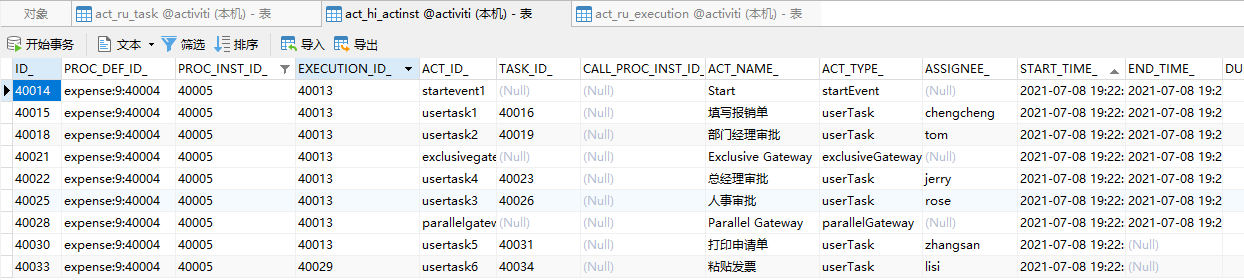

当我们完成了zhangsan和lisi的任务以后



接下来,演示包含网关(Inclusive Gateway)
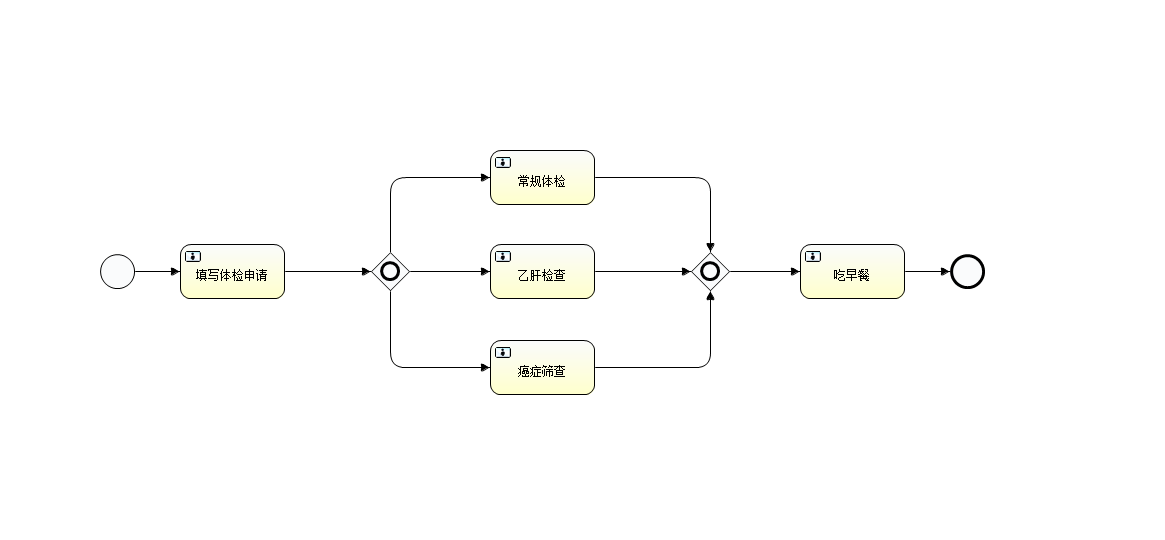
1 <? 2 <definitions "http://www.omg.org/spec/BPMN/20100524/MODEL" 3 "http://www.w3.org/2001/ 4 "http://www.w3.org/2001/ 5 "http://activiti.org/bpmn" 6 "http://www.omg.org/spec/BPMN/20100524/DI" 7 "http://www.omg.org/spec/DD/20100524/DC" 8 "http://www.omg.org/spec/DD/20100524/DI" 9 typeLanguage="http://www.w3.org/2001/ 10 expressionLanguage="http://www.w3.org/1999/XPath" 11 targetNamespace="http://www.activiti.org/test"> 12 13 <process id="HealthExamination" name="HealthExamination" isExecutable="true"> 14 <startEvent id="startevent1" name="Start"></startEvent> 15 <userTask id="usertask1" name="填写体检申请" activiti:assignee="${username}"></userTask> 16 <sequenceFlow id="flow1" sourceRef="startevent1" targetRef="usertask1"><......原文转载:http://www.shaoqun.com/a/859332.html
跨境电商:https://www.ikjzd.com/
gtin:https://www.ikjzd.com/w/136
智赢:https://www.ikjzd.com/w/1511
首信易:https://www.ikjzd.com/w/1841
1.工作流简单地来讲,工作流就是在计算机的协助下实现流程的自动化控制。目前,笔者熟知的主流的框架有:Camunda、Flowable、Activiti、jBPM、还有我们国产的盘古BPM、云程。其中,Camunda、Flowable都有商业版(企业版)和非商业版(社区开源版)。技术产品各有千秋,Flowable专注于流程引擎,Activiti现在专注于Cloud。笔者最推荐Camunda,盘古BP
万国邮政联盟:https://www.ikjzd.com/w/861
友家速递:https://www.ikjzd.com/w/1341
这样打造Listing,第二天他就出了200单!:https://www.ikjzd.com/articles/126920
突发!字节跳动或同意完全放弃TikTok股份:https://www.ikjzd.com/articles/126919
干货:分享7个亚马逊选品小妙招:https://www.ikjzd.com/articles/126918
重要|在亚马逊欧洲销售CE 标商品,若无合规负责人将被视为违法:https://www.ikjzd.com/articles/126917
在宿舍被男友抱起来啪 把我内裤拨到侧面直接做:http://lady.shaoqun.com/m/a/248348.html
头埋在双腿间吸食花蜜 深一点,我下面好爽:http://lady.shaoqun.com/m/a/247055.html
女海王阵型!不告诉男朋友就勾搭富二代!数百万粉丝,Tik Tok女人,网络名人,做了很多轮:http://lady.shaoqun.com/a/410933.html
清迈的一个天桥小舒林成同志,被居民举报:http://lady.shaoqun.com/a/410934.html
女人为什么选择"暧昧"?倾听中年妇女的心声:http://lady.shaoqun.com/a/410935.html
独立站高昂流量成废品,如何操作才能起死回生?(上):https://www.ikjzd.com/articles/146487

没有评论:
发表评论