AES类时微软MSDN中最常用的加密类,微软官网也有例子,参考链接:https://docs.microsoft.com/zh-cn/dotnet/api/system.security.cryptography.aes?view=netframework-4.8
但是这个例子并不好用,限制太多,通用性差,实际使用中,我遇到的更多情况需要是这样:
1、输入一个字节数组,经AES加密后,直接输出加密后的字节数组。
2、输入一个加密后的字节数组,经AES解密后,直接输出原字节数组。
对于我这个十八流业余爱好者来说,AES我是以用为主的,所以具体的AES是怎么运算的,我其实并不关心,我更关心的是AES的处理流程。结果恰恰这一方面,网上的信息差强人意,看了网上不少的帖子,但感觉都没有说完整说透,而且很多帖子有错误。
因此,我自己绘制了一张此种方式下的流程图:
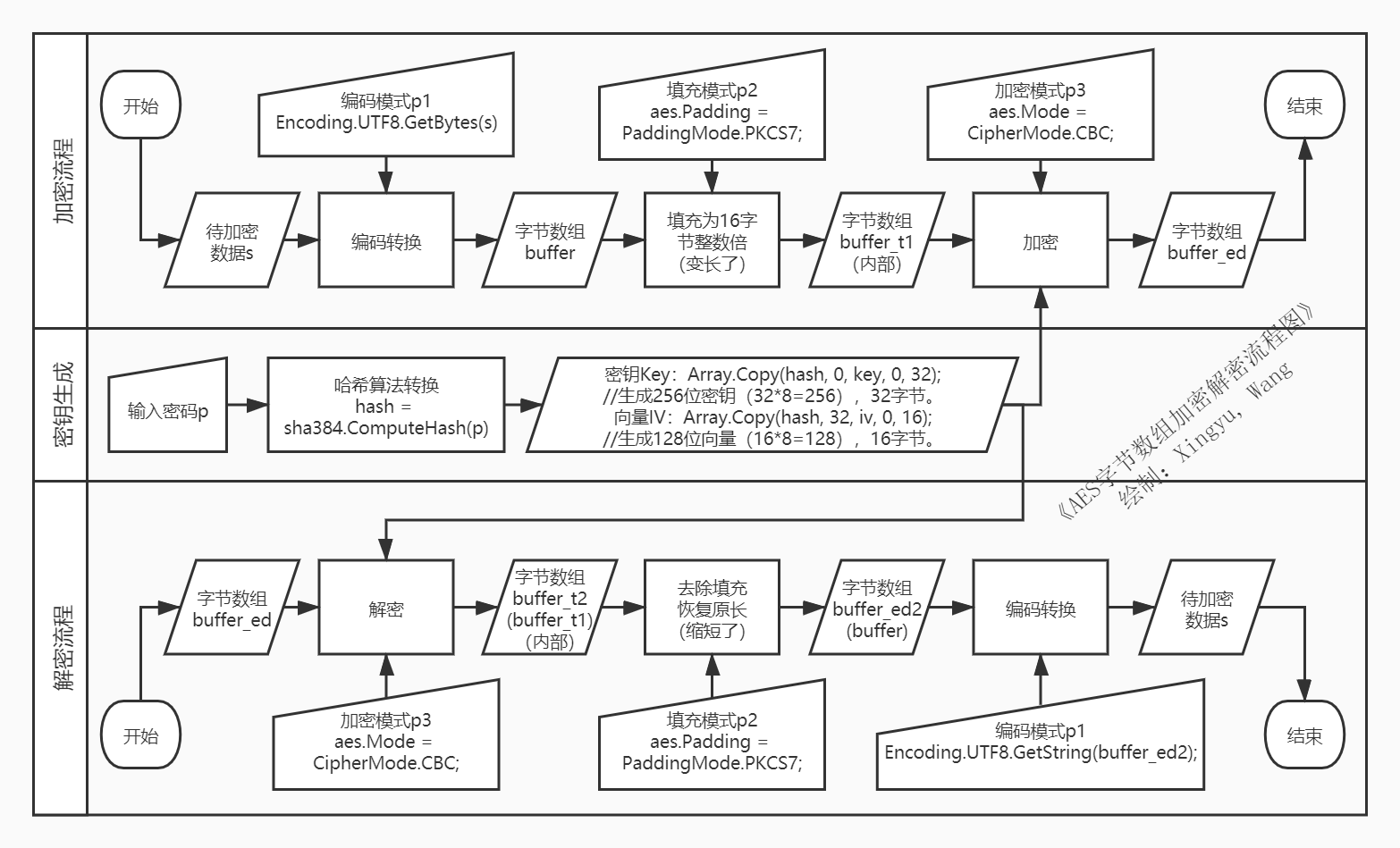
按照此流程图进行了核心代码的编写,验证方法AesCoreSingleTest既是依照此流程的产物,实例化类AesCoreSingle后调用此方法即可验证。
至于类中的异步方法EnOrDecryptFileAsync,则是专门用于文件加解密的处理,此异步方法参考自《C# 6.0学习笔记》(周家安 著)最后的示例,这本书写得真棒。
1 using System; 2 using System.Collections.Generic; 3 using System.IO; 4 using System.Linq; 5 using System.Security.Cryptography; 6 using System.Text; 7 using System.Threading; 8 using System.Threading.Tasks; 9 using System.Windows; 10 11 namespace AesSingleFile 12 { 13 class AesCoreSingle 14 { 15 /// <summary> 16 /// 使用用户口令,生成符合AES标准的key和iv。 17 /// </summary> 18 /// <param name="password">用户输入的口令</param> 19 /// <returns>返回包含密钥和向量的元组</returns> 20 private (byte[] Key, byte[] IV) GenerateKeyAndIV(string password) 21 { 22 byte[] key = new byte[32]; 23 byte[] iv = new byte[16]; 24 byte[] hash = default; 25 if (string.IsNullOrWhiteSpace(password)) 26 throw new ArgumentException("必须输入口令!"); 27 using (SHA384 sha = SHA384.Create()) 28 { 29 byte[] buffer = Encoding.UTF8.GetBytes(password); 30 hash = sha.ComputeHash(buffer); 31 } 32 //用SHA384的原因:生成的384位哈希值正好被分成两段使用。(32+16)*8=384。 33 Array.Copy(hash, 0, key, 0, 32);//生成256位密钥(32*8=256) 34 Array.Copy(hash, 32, iv, 0, 16);//生成128位向量(16*8=128) 35 return (Key: key, IV: iv); 36 } 37 38 public byte[] EncryptByte(byte[] buffer, string password) 39 { 40 byte[] encrypted; 41 using (Aes aes = Aes.Create()) 42 { 43 //设定密钥和向量 44 (aes.Key, aes.IV) = GenerateKeyAndIV(password); 45 //设定运算模式和填充模式 46 aes.Mode = CipherMode.CBC;//默认 47 aes.Padding = PaddingMode.PKCS7;//默认 48 //创建加密器对象(加解密方法不同处仅仅这一句话) 49 var encryptor = aes.CreateEncryptor(aes.Key, aes.IV); 50 using (MemoryStream msEncrypt = new MemoryStream()) 51 { 52 using (CryptoStream csEncrypt = new CryptoStream(msEncrypt, encryptor, CryptoStreamMode.Write))//选择Write模式 53 { 54 csEncrypt.Write(buffer, 0, buffer.Length);//对原数组加密并写入流中 55 csEncrypt.FlushFinalBlock();//使用Write模式需要此句,但Read模式必须要有。 56 encrypted = msEncrypt.ToArray();//从流中写入数组(加密之后,数组变长,详见方法AesCoreSingleTest内容) 57 } 58 } 59 } 60 return encrypted; 61 } 62 public byte[] DecryptByte(byte[] buffer, string password) 63 { 64 byte[] decrypted; 65 using (Aes aes = Aes.Create()) 66 { 67 //设定密钥和向量 68 (aes.Key, aes.IV) = GenerateKeyAndIV(password); 69 //设定运算模式和填充模式 70 aes.Mode = CipherMode.CBC;//默认 71 aes.Padding = PaddingMode.PKCS7;//默认 72 //创建解密器对象(加解密方法不同处仅仅这一句话) 73 var decryptor = aes.CreateDecryptor(aes.Key, aes.IV); 74 using (MemoryStream msDecrypt = new MemoryStream(buffer)) 75 { 76 using (CryptoStream csDecrypt = new CryptoStream(msDecrypt, decryptor, CryptoStreamMode.Read))//选择Read模式 77 { 78 byte[] buffer_T = new byte[buffer.Length];/*--s1:创建临时数组,用于包含可用字节+无用字节--*/ 79 80 int i = csDecrypt.Read(buffer_T, 0, buffer.Length);/*--s2:对加密数组进行解密,并通过i确定实际多少字节可用--*/ 81 82 //csDecrypt.FlushFinalBlock();//使用Read模式不能有此句,但write模式必须要有。 83 84 decrypted = new byte[i];/*--s3:创建只容纳可用字节的数组--*/ 85 86 Array.Copy(buffer_T, 0, decrypted, 0, i);/*--s4:从bufferT拷贝出可用字节到decrypted--*/ 87 } 88 } 89 return decrypted; 90 } 91 } 92 public byte[] EnOrDecryptByte(byte[] buffer, string password, ActionDirection direction) 93 { 94 if (buffer == null) 95 throw new ArgumentNullException("buffer为空"); 96 if (password == null || password == "") 97 throw new ArgumentNullException("password为空"); 98 if (direction == ActionDirection.EnCrypt) 99 return EncryptByte(buffer, password);100 else101 return DecryptByte(buffer, password);102 }103 public enum ActionDirection//该枚举说明是加密还是解密104 {105 EnCrypt,//加密106 DeCrypt//解密107 }108 public static void AesCoreSingleTest(string s_in, string password)//验证加密解密模块正确性方法109 {110 byte[] buffer = Encoding.UTF8.GetBytes(s_in);111 AesCoreSingle aesCore = new AesCoreSingle();112 byte[] buffer_ed = aesCore.EncryptByte(buffer, password);113 byte[] buffer_ed2 = aesCore.DecryptByte(buffer_ed, password);114 string s = Encoding.UTF8.GetString(buffer_ed2);115 string s2 = "下列字符串\n" + s + '\n' + $"原buffer长度 → {buffer.Length}, 加密后buffer_ed长度 → {buffer_ed.Length}, 解密后buffer_ed2长度 → {buffer_ed2.Length}";116 MessageBox.Show(s2);117 /* 字符串在加密前后的变化(默认CipherMode.CBC运算模式, PaddingMode.PKCS7填充模式)118 * 1、如果数组长度为16的倍数,则加密后的数组长度=原长度+16119 如对于下列字符串120 D:\User\Documents\Administrator - DOpus Config - 2020-06-301.ocb121 使用UTF8编码转化为字节数组后,122 原buffer → 64, 加密后buffer_ed → 80, 解密后buffer_ed2 → 64123 * 2、如果数组长度不为16的倍数,则加密后的数组长度=16倍数向上取整124 如对于下列字符串125 D:\User\Documents\cc_20200630_113921.reg126 使用UTF8编码转化为字节数组后127 原buffer → 40, 加密后buffer_ed → 48, 解密后buffer_ed2 → 40 128 参考文献:129 1-《AES补位填充PaddingMode.Zeros模式》130 2-《关于PKCS5Padding与PKCS7Padding的区别》https://www.cnblogs.com/midea0978/articles/1437257.html131 3-《AES-128 ECB 加密有感》132 */133 }134 135 /***---声明CancellationTokenSource对象--***/136 private CancellationTokenSource cts;//using System.Threading;引用137 public Task EnOrDecryptFileAsync(Stream inStream, long inStream_Seek, Stream outStream, long outStream_Seek, string password, ActionDirection direction, IProgress<int> progress)138 {139 /***---实例化CancellationTokenSource对象--***/140 cts?.Dispose();//cts为空,不动作,cts不为空,执行Dispose。141 cts = new CancellationTokenSource();142 143 Task mytask = new Task(144 () =>145 {146 EnOrDecryptFile(inStream, inStream_Seek, outStream, outStream_Seek, password, direction, progress);147 }, cts.Token, TaskCreationOptions.LongRunning);148 mytask.Start();149 return mytask;150 }151 public void EnOrDecryptFile(Stream inStream, long inStream_Seek, Stream outStream, long outStream_Seek, string password, ActionDirection direction, IProgress<int> progress)152 {153 if (inStream == null || outStream == null)154 throw new ArgumentException("输入流与输出流是必须的");155 //--调整流的位置(通常是为了避开文件头部分)156 inStream.Seek(inStream_Seek, SeekOrigin.Begin);157 outStream.Seek(outStream_Seek, SeekOrigin.Begin);158 //用于记录处理进度159 long total_Length = inStream.Length - inStream_Seek;160 long totalread_Length = 0;161 //初始化报告进度162 progress.Report(0);163 164 using (Aes aes = Aes.Create())165 {166 //设定密钥和向量167 (aes.Key, aes.IV) = GenerateKeyAndIV(password);168 //创建加密器解密器对象(加解密方法不同处仅仅这一句话)169 ICryptoTransform cryptor;170 if (direction == ActionDirection.EnCrypt)171 cryptor = aes.CreateEncryptor(aes.Key, aes.IV);172 else173 cryptor = aes.CreateDecryptor(aes.Key, aes.IV);174 using (CryptoStream cstream = new CryptoStream(outStream, cryptor, CryptoStreamMode.Write))175 {176 byte[] buffer = new byte[512 * 1024];//每次读取512kb的数据177 int readLen = 0;178 while ((readLen = inStream.Read(buffer, 0, buffer.Length)) != 0)179 {180 // 向加密流写入数据181 cstream.Write(buffer, 0, readLen);182 totalread_Length += readLen;183 //汇报处理进度184 if (progress != null)185 {186 long per = 100 * totalread_Length / total_Length;187 progress.Report(Convert.ToInt32(per));188 }189 }190 }191 }192 }193 }194 }AES字节数组加密解密流程【进阶战术课】Shopee爆款选品、 人效分配、 mav、 站外推广---如何创建Facebook主页(附带图文,非常非常详细)、 常规手段下的亚马逊赶跟卖6大方法、 投广告却没有效果?你需要这份谷歌广告优化完整教程!、 扒一扒Wish与抖音的算法,什么是大数据的流量池?、 瞄准低收入群体,亚马逊又推新计划!、

没有评论:
发表评论