需求
之前写过一个图片上传实现方法:https://www.cnblogs.com/phdeblog/p/13236363.html
不过这种方法局限性很大:
- 图片存储的位置写死,不可以灵活配置。
- 没有专门实现"下载",虽然可以直接预览例如浏览器输入图片地址 ——> (2)传到后台服务器——>(3)初步校验,上传的文件不能为空——>(4)唯一性校验,如果你的项目只能存在一个文件,必须把已有的文件删去(可选)——> (5) 检查是否有同名文件,同名文件是否覆盖(可选)
——> (6) 开始上传文件 ——> (7) 检查文件类型是否满足需求——> (8) 用一个变量保留原有的名字,将文件写入服务器本地 ——> (9) 如果写入成功,将路径、新的文件名、旧的文件名、文件的功能 等等写入数据库。
下载流程:
从数据库取出指定文件的描述信息,描述信息里面有文件所在目录,用java的api获取文件对象,转化成字节写入response,返回给前端。
完整实现
依赖
<dependency> <groupId>org.springframework.boot</groupId> <artifactId>spring-boot-starter-web</artifactId> </dependency> <dependency> <groupId>org.projectlombok</groupId> <artifactId>lombok</artifactId> <optional>true</optional> </dependency> <dependency> <groupId>com.baomidou</groupId> <artifactId>mybatis-plus-boot-starter</artifactId> <version>3.4.0</version> </dependency> <dependency> <groupId>mysql</groupId> <artifactId>mysql-connector-java</artifactId> </dependency> <dependency> <groupId>org.springframework.boot</groupId> <artifactId>spring-boot-starter-test</artifactId> <scope>test</scope> <exclusions> <exclusion> <groupId>org.junit.vintage</groupId> <artifactId>junit-vintage-engine</artifactId> </exclusion> </exclusions> </dependency>
SpringBoot版本
<parent> <groupId>org.springframework.boot</groupId> <artifactId>spring-boot-starter-parent</artifactId> <version>2.3.5.RELEASE</version> <relativePath/> <!-- lookup parent from repository --> </parent>
目录结构
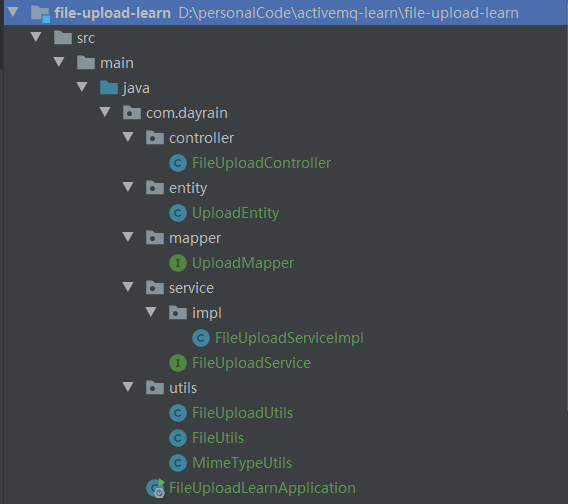
文件上传工具类
文件上传工具类有三个,功能不一致。
FileUploadUtils
******可以在这里修改文件默认存放位置
上传文件,支持默认路径存储、也支持指定目录存储。
在SpringBoot还需要在配置文件中配置上传文件的大小上限,默认是2MB。
public class FileUploadUtils { /** * 默认大小 50M */ public static final long DEFAULT_MAX_SIZE = 50 * 1024 * 1024; /** * 默认的文件名最大长度 100 */ public static final int FILE_NAME_MAX = 100; /** * 默认上传的地址 */ private static String DEFAULT_BASE_FILE = "D:\\personalCode\\activemq-learn\\file-upload-learn\\src\\main\\resources\\upload"; /** * 按照默认的配置上床文件 * * @param file 文件 * @return 文件名 * @throws IOException */ public static final String upload(MultipartFile file) throws IOException { try { return upload(FileUploadUtils.DEFAULT_BASE_FILE, file, MimeTypeUtils.DEFAULT_ALLOWED_EXTENSION); } catch (Exception e) { throw new IOException(e.getMessage(), e); } } /** * 根据文件路径上传 * * @param baseDir 相对应用的基目录 * @param file 上传的文件 * @return 文件名称 * @throws IOException */ public static final String upload(String baseDir, MultipartFile file) throws IOException { try { return upload(baseDir, file, MimeTypeUtils.DEFAULT_ALLOWED_EXTENSION); } catch (Exception e) { throw new IOException(e.getMessage(), e); } } /** * 文件上传 * @param baseDir 相对应用的基目录 * @param file 上传的文件 * @param allowedExtension 上传文件类型 * @return 返回上传成功的文件名 * @throws FileSizeLimitExceededException 如果超出最大大小 * @throws IOException 比如读写文件出错时 */ public static final String upload(String baseDir, MultipartFile file, String[] allowedExtension) throws Exception { //合法性校验 assertAllowed(file, allowedExtension); String fileName = encodingFileName(file); File desc = getAbsoluteFile(baseDir, fileName); file.transferTo(desc); return desc.getAbsolutePath(); } private static final File getAbsoluteFile(String uploadDir, String fileName) throws IOException { File desc = new File(uploadDir + File.separator + fileName); if (!desc.getParentFile().exists()) { desc.getParentFile().mkdirs(); } if (!desc.exists()) { desc.createNewFile(); } return desc; } /** * 对文件名特殊处理一下 * * @param file 文件 * @return */ private static String encodingFileName(MultipartFile file) { SimpleDateFormat simpleDateFormat = new SimpleDateFormat("yyyy-MM-dd"); String datePath = simpleDateFormat.format(new Date()); return datePath + "-" + UUID.randomUUID().toString() + "." + getExtension(file); } /** * 文件合法性校验 * * @param file 上传的文件 * @return */ public static final void assertAllowed(MultipartFile file, String[] allowedExtension) throws Exception { if (file.getOriginalFilename() != null) { int fileNamelength = file.getOriginalFilename().length(); if (fileNamelength > FILE_NAME_MAX) { throw new Exception("文件名过长"); } } long size = file.getSize(); if (size > DEFAULT_MAX_SIZE) { throw new Exception("文件过大"); } String extension = getExtension(file); if (allowedExtension != null && !isAllowedExtension(extension, allowedExtension)) { throw new Exception("请上传指定类型的文件!"); } } /** * 判断MIME类型是否是允许的MIME类型 * * @param extension * @param allowedExtension * @return */ public static final boolean isAllowedExtension(String extension, String[] allowedExtension) { for (String str : allowedExtension) { if (str.equalsIgnoreCase(extension)) { return true; } } return false; } /** * 获取文件名的后缀 * * @param file 表单文件 * @return 后缀名 */ public static final String getExtension(MultipartFile file) { String fileName = file.getOriginalFilename(); String extension = null; if (fileName == null) { return null; } else { int index = indexOfExtension(fileName); extension = index == -1 ? "" : fileName.substring(index + 1); } if (StringUtils.isEmpty(extension)) { extension = MimeTypeUtils.getExtension(file.getContentType()); } return extension; } public static int indexOfLastSeparator(String filename) { if (filename == null) { return -1; } else { int lastUnixPos = filename.lastIndexOf(47); int lastWindowsPos = filename.lastIndexOf(92); return Math.max(lastUnixPos, lastWindowsPos); } } public static int indexOfExtension(String filename) { if (filename == null) { return -1; } else { int extensionPos = filename.lastIndexOf(46); int lastSeparator = indexOfLastSeparator(filename); return lastSeparator > extensionPos ? -1 : extensionPos; } } public void setDEFAULT_BASE_FILE(String DEFAULT_BASE_FILE) { FileUploadUtils.DEFAULT_BASE_FILE = DEFAULT_BASE_FILE; } public String getDEFAULT_BASE_FILE() { return DEFAULT_BASE_FILE; }}FileUtils
******文件下载需要用到这边的writeByte
主要功能:删除文件、文件名校验、文件下载时进行字节流写入
public class FileUtils { //文件名正则校验 public static String FILENAME_PATTERN = "[a-zA-Z0-9_\\-\\|\\.\\u4e00-\\u9fa5]+"; public static void writeBytes(String filePath, OutputStream os) { FileInputStream fi = null; try { File file = new File(filePath); if (!file.exists()) { throw new FileNotFoundException(filePath); } fi = new FileInputStream(file); byte[] b = new byte[1024]; int length; while ((length = fi.read(b)) > 0) { os.write(b, 0, length); } } catch (Exception e) { e.printStackTrace(); } finally { if(os != null) { try { os.close(); }catch (IOException e) { e.printStackTrace(); } } if(fi != null) { try { fi.close(); }catch (IOException e) { e.printStackTrace(); } } } } /** * 删除文件 * @param filePath 文件路径 * @return 是否成功 */ public static boolean deleteFile(String filePath) { boolean flag = false; File file = new File(filePath); if (file.isFile() && file.exists()) { file.delete(); flag = true; } return flag; } /** * 文件名校验 * @param fileName 文件名 * @return true 正常, false 非法 */ public static boolean isValidName(String fileName) { return fileName.matches(FILENAME_PATTERN); } /** * 下载文件名重新编码 * * @param request 请求对象 * @param fileName 文件名 * @return 编码后的文件名 */ public static String setFileDownloadHeader(HttpServletRequest request, String fileName) throws UnsupportedEncodingException { final String agent = request.getHeader("USER-AGENT"); String filename = fileName; if (agent.contains("MSIE")) { // IE浏览器 filename = URLEncoder.encode(filename, "utf-8"); filename = filename.replace("+", " "); } else if (agent.contains("Firefox")) { // 火狐浏览器 filename = new String(fileName.getBytes(), "ISO8859-1"); } else if (agent.contains("Chrome")) { // google浏览器 filename = URLEncoder.encode(filename, "utf-8"); } else { // 其它浏览器 filename = URLEncoder.encode(filename, "utf-8"); } return filename; }}MimeTypeUtils
******DEFAULT_ALLOWED_EXTENSION 可以指定允许文件上传类型
媒体工具类,支持指定上传文件格式。
public class MimeTypeUtils { public static final String IMAGE_PNG = "image/png"; public static final String IMAGE_JPG = "image/jpg"; public static final String IMAGE_JPEG = "image/jpeg"; public static final String IMAGE_BMP = "image/bmp"; public static final String IMAGE_GIF = "image/gif"; public static final String[] IMAGE_EXTENSION = {"bmp", "gif", "jpg", "jpeg", "png"}; public static final String[] FLASH_EXTENSION = {"swf", "flv"}; public static final String[] MEDIA_EXTENSION = {"swf", "flv", "mp3", "wav", "wma", "wmv", "mid", "avi", "mpg", "asf", "rm", "rmvb"}; public static final String[] DEFAULT_ALLOWED_EXTENSION = { // 图片 "bmp", "gif", "jpg", "jpeg", "png", // word excel powerpoint "doc", "docx", "xls", "xlsx", "ppt", "pptx", "html", "htm", "txt", // 压缩文件 "rar", "zip", "gz", "bz2", // pdf "pdf"}; public static String getExtension(String prefix) { switch (prefix) { case IMAGE_PNG: return "png"; case IMAGE_JPG: return "jpg"; case IMAGE_JPEG: return "jpeg"; case IMAGE_BMP: return "bmp"; case IMAGE_GIF: return "gif"; default: return ""; } }}controller层
因为是测试demo,比较简陋,一般项目里会在controller层这边做异常捕捉,和统一返回格式。我这边就偷个懒,省了哈。
@RestControllerpublic class FileUploadController { @Autowired FileUploadService fileUploadService; //使用默认路径 @RequestMapping("/upload") public String upload(MultipartFile file) throws Exception { fileUploadService.upload(file, null); return null; } //自定义路径 @RequestMapping("/upload/template") public String uploadPlace(MultipartFile file) throws Exception { fileUploadService.upload(file, "H:\\upload"); return null; } //下载 @GetMapping("/download/file") public String downloadFile(HttpServletResponse response) throws IOException { fileUploadService.download(response, "word文件"); return null; }}entity实体类
@TableName("db_upload")@Datapublic class UploadEntity { @TableId(type = IdType.AUTO) private Long id; //存在本地的地址 private String location; //名称,业务中用到的名称,比如 "档案模板"、"用户信息"、"登录记录"等等 private String name; //保留文件原来的名字 private String oldName; //描述(可以为空) private String description; private Date createTime; private Date updateTime;}mapper
public interface UploadMapper extends BaseMapper<UploadEntity> {}service层
public interface FileUploadService { void upload(MultipartFile file, String baseDir) throws Exception; void download(HttpServletResponse response , String newName) throws IOException;}service实现层
@Servicepublic class FileUploadServiceImpl implements FileUploadService { @Autowired UploadMapper uploadMapper; @Override public void upload(MultipartFile file, String baseDir) throws Exception {  //就算什么也不传,controller层的file也不为空,但是originalFilename会为空(亲测)  String originalFilename = file.getOriginalFilename();  if(originalFilename == null || "".equals(originalFilename)) {   throw new Exception( "上传文件不能为空");  }  //检测是否上传过同样的文件,如果有的话就删除。(这边可根据个人的情况修改逻辑)  QueryWrapper<UploadEntity> queryWrapper = new QueryWrapper<>();  queryWrapper.eq("old_name", originalFilename);  UploadEntity oldEntity = uploadMapper.selectOne(queryWrapper);  //新的文件  UploadEntity uploadEntity = new UploadEntity();  uploadEntity.setCreateTime(new Date());  uploadEntity.setUpdateTime(new Date());  uploadEntity.setOldName(file.getOriginalFilename());
  //这边可以根据业务修改,项目中不要写死  uploadEntity.setName("上传模板");  String fileLocation = null ;  if(baseDir != null) {   fileLocation = FileUploadUtils.upload(baseDir, file);  }else {   fileLocation = FileUploadUtils.upload(file);  }  uploadEntity.setLocation(fileLocation);  uploadMapper.insert(uploadEntity);  if(oldEntity != null) {   //确保新的文件保存成功后,删除原有的同名文件(实体文件 and 数据库文件)   FileUtils.deleteFile(oldEntity.getLocation());   uploadMapper.deleteById(oldEntity.getId());  } } @Override public void download(HttpServletResponse response, String newName) throws IOException {  QueryWrapper<UploadEntity> queryWrapper = new QueryWrapper<>();  queryWrapper.eq("name", newName);  UploadEntity uploadEntity = uploadMapper.selectOne(queryWrapper);  response.setHeader("content-type", "application/octet-stream");  response.setContentType("application/octet-stream");
   //这边可以设置文件下载时的名字,我这边用的是文件原本的名字,可以根据实际场景设置  response.setHeader("Content-Disposition", "attachment;filename=" + URLEncoder.encode(uploadEntity.getOldName(), "UTF-8"));  FileUtils.writeBytes(uploadEntity.getLocation(), response.getOutputStream()); }}
启动类
@SpringBootApplication@MapperScan("com.dayrain.mapper")public class FileUploadLearnApplication { public static void main(String[] args) { SpringApplication.run(FileUploadLearnApplication.class, args); }}配置文件
server: port: 8080spring: datasource: driver-class-name: com.mysql.cj.jdbc.Driver url: jdbc:mysql://ip:3306/upload?useUnicode=true&characterEncoding=UTF-8 username: root password: root servlet: multipart: max-file-size: 10MB #单次上传文件最大不超过10MB max-request-size: 100MB #文件总上传大小不超过100MB
SQL文件
DROP TABLE IF EXISTS `db_upload`;CREATE TABLE `db_upload` ( `id` bigint(20) NOT NULL AUTO_INCREMENT, `location` varchar(255) CHARACTER SET utf8mb4 COLLATE utf8mb4_general_ci NULL DEFAULT NULL, `name` varchar(255) CHARACTER SET utf8mb4 COLLATE utf8mb4_general_ci NULL DEFAULT NULL, `old_name` varchar(255) CHARACTER SET utf8mb4 COLLATE utf8mb4_general_ci NULL DEFAULT NULL, `description` varchar(255) CHARACTER SET utf8mb4 COLLATE utf8mb4_general_ci NULL DEFAULT NULL, `create_time` datetime(0) NULL DEFAULT NULL, `update_time` datetime(0) NULL DEFAULT NULL, PRIMARY KEY (`id`) USING BTREE) ENGINE = InnoDB AUTO_INCREMENT = 34 CHARACTER SET = utf8mb4 COLLATE = utf8mb4_general_ci ROW_FORMAT = Dynamic;
总结
上述代码以经过简单测试,无中文乱码现象,逻辑基本满足目前项目使用。
因为项目用到文件的地方不是很多,所以就把文件和项目放在一个服务器里面,不涉及远程调用。
如果文件上传下载使用频繁,例如电子档案系统,电子书,网盘等等,需要考虑使用专门的文件服务器,拆分业务,缓解服务端压力。
如果对您有帮助,欢迎给在下点个赞。
如有错误,恳请批评指正!
原文转载:http://www.shaoqun.com/a/489365.html
跨境通电子商务平台:https://www.ikjzd.com/w/1329.html
急速:https://www.ikjzd.com/w/1861
拍拍:https://www.ikjzd.com/w/2205
需求之前写过一个图片上传实现方法:https://www.cnblogs.com/phdeblog/p/13236363.html不过这种方法局限性很大:图片存储的位置写死,不可以灵活配置。没有专门实现"下载",虽然可以直接预览例如浏览器输入图片地址——>(2)传到后台服务器——>(3)初步校验,上传的文件不能为空——>(4)唯一性校验,如果你的项目只能存在一个文件,必须把已有的
e邮宝:https://www.ikjzd.com/w/594.html?source=tagwish
taofenba:https://www.ikjzd.com/w/1725
梅州客天下好玩吗?:http://tour.shaoqun.com/a/1867.html
让你垂涎的【四川美食】 - :http://tour.shaoqun.com/a/12832.html
深圳世界之窗每天的表演都一样吗?:http://tour.shaoqun.com/a/1302.html

没有评论:
发表评论